Agent Layer- Building Agentic Workflows to Solve Real Problems
Disclaimer: This is not a tutorial, book, or a whitepaper. The content on this file are notes I scrambled while learning the Agentic systems. The major resourses I have relied on are Andrew Ng’s course on Agentic AI, as well as the book “Agentic Design Patterns” by Antonio Gulli. In addition to that I have looked into several blog posts, youtube videos, and whole lot of brainstorming with Gemini-3 models. I created this document to keep the things organized in a way that makes sense in my brain. If it does makes sense in your mind as well, feel free to use it.
1. What Is an Agentic Workflow?
Artificial Intellegence (AI) has been reshaping the way organizations operate - from simple task like email automation to complex AI agents that can perform dynamic tasks. In the forefront of recent development are agentic workflows, the AI-driven processes capable of making the decisions, taking actions, and coordinating tasks in a dynamically evolving environments with minimal human intervention. These tools are normally referred as the Agents. In this writeup, we’ll use terms like Agents, Agentic AI, Agentic Workflows frequently. First, let’s get acquainted with these terms.
1.1 Agents vs LLM Pipelines
Using prompt chains with LLM APIs, or tools like LangChain or PromptFlow, you can link steps together, e.g., prompt –> output1 –> next_prompt –> result. By decomposing a complex task into a very simple components, these tools provide Rube Goldberg machine’esque chains for problem solving. While impressive, these LLM pipelines are very rigid and executes the instructions it was given, regardless of external changes or internal errors.
AI agents, on the other hand, are less of an assembly line, and more of a process-manager. In contrast to a specific task, it is often provided a goal and it operates like a control system, in a continuous cycle of observation, reasoning, and action. Instead of following a strict, pre-defined chain of events, these systems can decide what needs to be done, choose how to do it (selecting tools), check their results against the goal, and revise the steps if needed by learning from failures and sub-optimal results.
| Feature | LLM Pipeline( DAG ) | Agentic Workflow ( Loop ) |
|---|---|---|
| Structure | Linear or Directed Acyclic graph (DAG) | Cyclic (Loops allowed) |
| Control logic | Hardcoded by the engineer ( If X then Y) | Delegated to the LLM (Model decides the next step) |
| Failure Mode | Exception/ Crash | Retry/ Self-correction |
| Example | “Summarize text -> Extract Entities -> Save to DB” | “Write code -> Run tests -> Read error -> Fix code -> Run tests …” |
1.2 Degrees of Autonomy (It’s in a Spectrum)
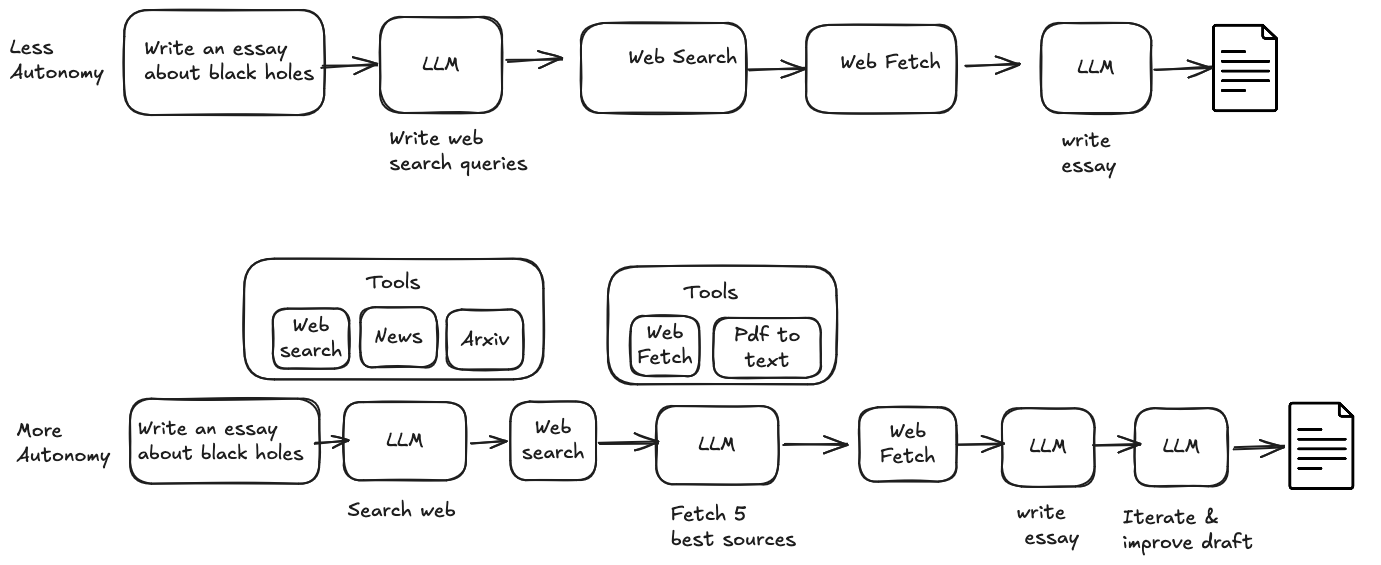
There seems to be a lot of friction on current discource regarding what makes an agent a “Agent”. For the purists (Academics/Researchers), an Agent is an autonomous entity and sets it’s own sub-goals. If you hard code the steps, it’s just a “fancy script”, not an agent.
Andrew Ng talks about this in his “Agentic AI” course, where he says the confusion comes from treating “Agent” as a noun ranther than “Agentic” as an adjective(a way you design systems). He argues: “Agentic” is a design pattern. If you take a “parrot” LLM, and wrap it in a for loop so it can correct its own errors, you have added the “agency” to the system, even though the outer loop is rigid.
At the current state:
- Trap: Trying to build “An Agent”, i.e., a digital employee.
- Pragmatic’s guidence: Try to build “Agentic Workflows”. You can have a rigid pipeline, but if you use LLM to reiterate some tasks based on the output( adding agency to the workflow), you got your “Agentic AI” that is very capable of solving complex problems.
1.3 When Not to Use Agents
“Agentic” is expensive. It costs more tokens, adds latency( due to loops), and introduces non-determinism. it’s best to stick with Pipelines when:
- Latency is critical: E.g., if the user needs an answer in < 500ms, you can’t afford a reflection loop
- The process is known: If the steps are always A -> B -> C, making an agent “decide” to do B is a plain waste of money. These problems are better solved with fixed DAGs
- Audutability is important: For e.g., in banking or healthcare, where compliance is first priority during decision making, “LLM felt like it” is not a valid audit trail.
2. Why Agentic Workflows Matter
2.1 Capability Amplification
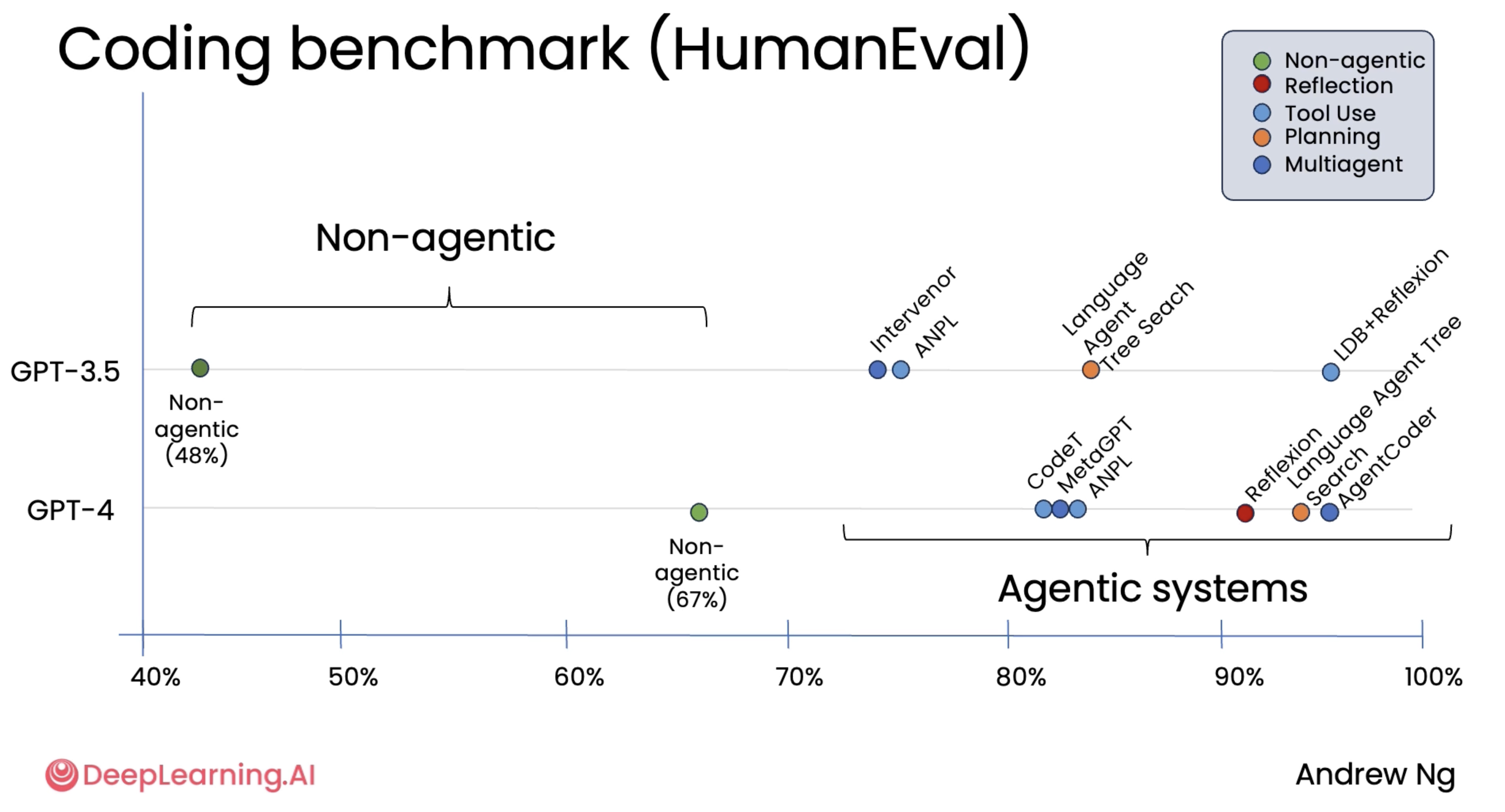
Andrew Ng’s course on Agentic AI had a chart that showed the performance of AI models and systems for HumanEval benchmark, a coding benchmark used frequently. The numbers suggests that wrapping frontier models within agentic workflows provide much better improvement compared to the improvement we get from the newer generation of the model. In fact GPT-3.5 within just about any popular agentic systems far outperformed the GPT-4’s zero-shot performance. So using agentic workflow in conjunction to the state-of-the-art model is not only the best approach for high accuracy, but a necessity.
2.2 Agents as Trajectory Optimizers
Why does the loop work? Because LLMs are probabilistic. They drift.
In a Pipeline: If the model drifts off-track in Step 1, Step 2 is doomed. The error compounds.
In an Agent: The system treats the output as a trajectory.
- Step 1: Model generates a path.
- Step 2: Observer (Critic) looks at the path. “Is this going towards the goal?”
- Step 3: If yes, proceed. If no, nudge it back.
This is why o1/thinking models are winning. They aren’t “smarter” in the weights; they are just running a hidden “Chain of Thought” loop behind the scenes. You can use agentic workflows to solve your own specific problems.
2.3 Real-World Examples
- Debugging, research, optimization, and investigation tasks
3. Core Building Blocks of an Agent Layer
3.1 Explicit State Modeling (The “brain”)
LLM’s conversation history as the “state” is not ideal, it is messy and unstructured. Instead, treat the Agent like a Finite State Machine (FSM). The State needs to be structured object - a strict schema - that exists outside of LLM.
- The Principle: The state is the “single state of truth”. The LLM is just a function that reads the state and proposes a modifications to it
- The implementation: Use strict schemas (Pydantic in Python, Zod in TS). Instead of long string of chat logs, structured format like JSON that can be validated are preferred
The explicit state provides few utilities. (1) If you record the states after every step, you can replay a crash exactly. (2) It enables you to pause the agent, save the state JSON to the database, and resume it 3 days later when the user replies with information necessary for next step. (3) Makes testing and evaluating easier. The states enable more quantitative evaluation opportunities compared to using chat history.
3.2 Memory Types
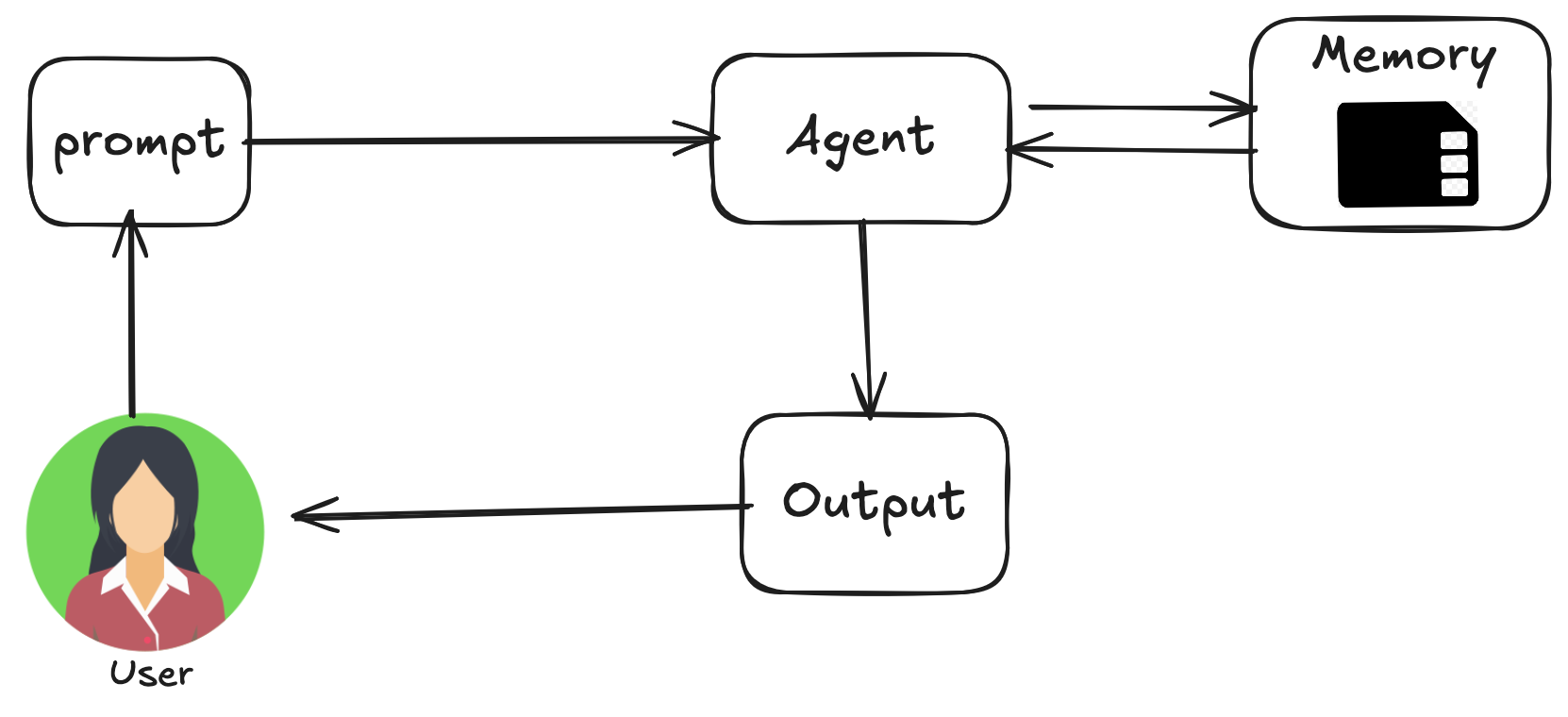
Short-term memory (context window / scratchpad) -
Usually live in RAM. It is fast, smart, but expensive and finite.
- The Problem: As the agent loops, the history grows. Eventually, it hits the token limit(or just gets confused by the noise)
- The Fix: Context pruning( garbage collection for the mind). Basically, you need a strategy to forget useless informations. Few strategies (1) Sliding Window: Keep only the last 5 iterations( it’s risky, might lose the goal or crucial information) (2) Summarization: Every 10 steps, ask LLM to summerize the progress and replace the history with that summary (3) Scratchpad Clearing If model fails 3 times, delete those 3 failures from the history. Don’t let model get confused from it’s own mistakes.
Long-term (Persistence)
This is the information that lives in your hard drive, Vector DB (RAGs) or SQL. Long term memory allows system to retain information across different conversations, providing a deeper level of context and personalization. The long term memory can be (1) Semantic Memory: Remembering facts: This involves retaining a specific facts and concepts such as user preferences or domain knowledge.This can be used to ground agents response, making it more personalized and relevant. (2) Episodic Memory: Remembering Experiences: Recalling past events or actions to remember how to accomplish a task. In practice, it can be implemented via few-shot prompting. (3) Procedural Memory: remembering Rules: This is the memory of how to perform tasks–the agent’s core instructions and behaviors, often contained in its system prompt.
One common pitfall to avoid when we’re accessing long term memory to aid agent’s context is “Only fetch what is relevant to the current step. Do not dump the entire user manual into the context window just because you have it”.
Implementation notes
Every interaction with an agent can be considered a unique conversation thread. Agents might need to access data from earlier interactions. Here are the core parts of this:
- Session: An individual chat thread that logs messages and actions(Events) for that specific interaction, also storing the temporary data (State) relevant to that conversation
- State(session.State): Data stored within a Session, containing information relevant only to the current, active chat thread.
- Memory: A searchable repository of information sourced from various past chats or external sources, serving as a resource for data retrieval beyond the immediate conversation.
3.3 Control Loop (The Heartbeat)
This the the most important piece of code in your agentic workflows. It’s not a chain, it is a Loop.
The Cycle: Decide → Act → Observe → Update
- Decide: LLM looks at the state, chooses a Tool.
- Act: Python executes the Tool (LLM doesnot touch this).
- Observe: The Tool returns an output( or an error stack trace).
- Update: Update the state object with the result. Check for termination.
Explicit vs Implicit
- Implicit: Langchain.run(agent). It works until it breaks, and then you have no idea why
- Explicit: A simple Python while loop or a LangGraph graph, where you can see exactly where the flow controls are.
Implicit loops assume the agent runs from start to finish in one go. Real-world agents need to sleep, wait, and ask for help. An Explicit Loop allows you to treat the agent like a turn-based game: you can save the game, walk away, and reload it later. You can’t do that if the logic is hidden inside a run() function.”
The State Must Be transparent to the Loop At step 4, if the agent decides to delete_database, that intent is just a piece of data in the State object: {“intent”: “delete_database”}. Because your Control Loop can read that state before execution, you can treat it like any other variable.
Code: if action.name == "delete_database": raise SystemAlert()
Deterministic Guards > Probabilistic Logic you never trust the LLM to police itself. For e.g., asking the LLM “Are you sure this is safe?” (The LLM might hallucinate “Yes”). But if you hardcoded Python function that checks if filename in protected_list, it is much more reliable.
4. Design Patterns for Agentic Systems
4.1 Prompt Chaining
Complex multifaceted tasks when fed as a single task often leads to significant performance issues. The cognitive load on the model increases the likelihood of errors such as overlooking instructions, losing context, and generating incorrect information. A monolithic prompt struggles to manage multiple constraints and sequential reasoning steps effectively. This results in unreliable and inaccurate outputs.
Prompt chaining provides the standardized solution by breaking down the complex problem into a sequence of smaller, interconnected sub-tasks. Each step in the chain uses a focused prompt to perform a specific operation, significantly improving the reliability and control. In addition, chaining allows the LLM to utilize the tools and context necessary for a focused, modular task that significantly improves the quality of output. 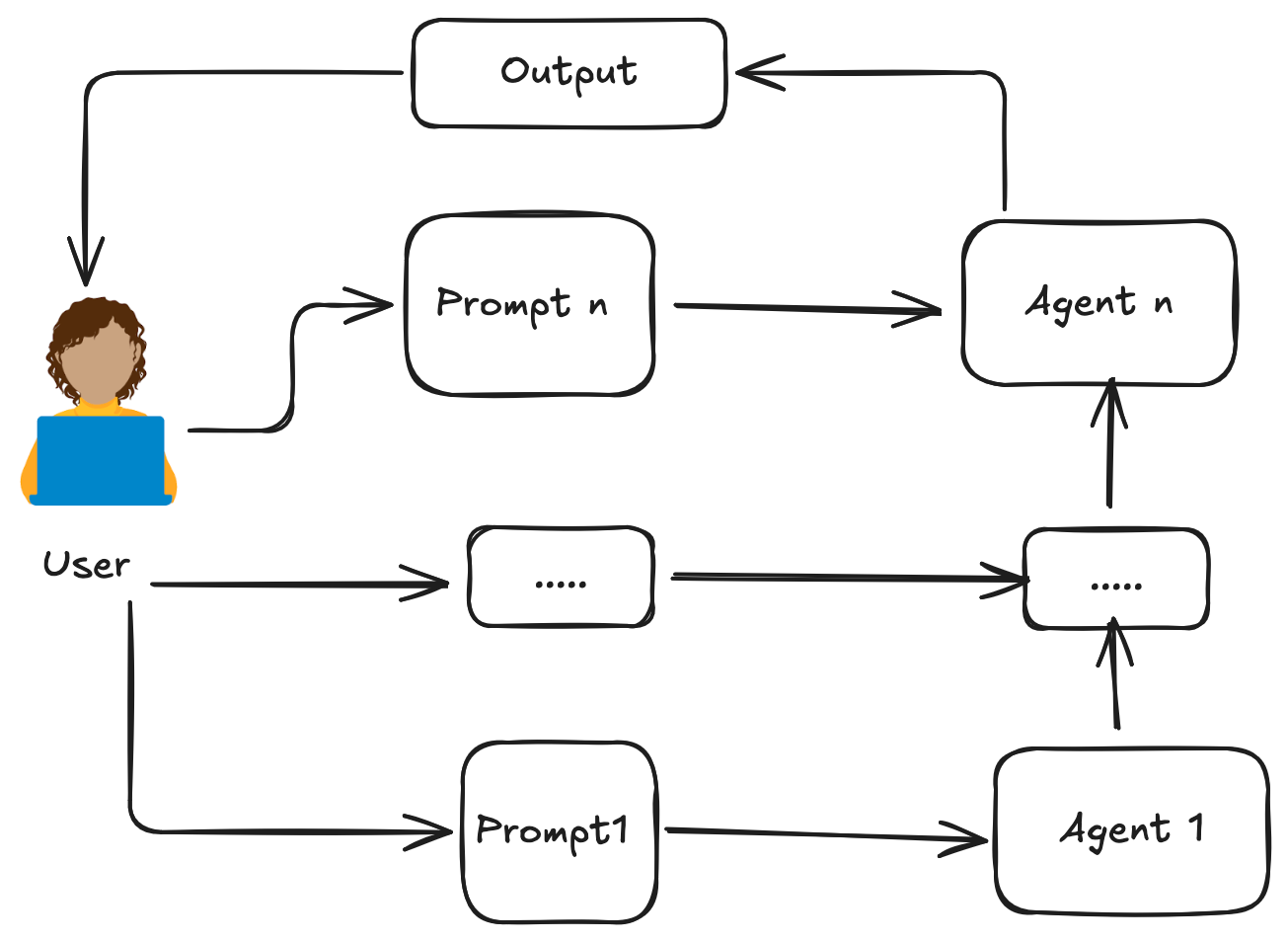
TODO: add the code
4.2 Routing
Chaining provides a great way of decomposing a complex problem into a sequence of sub-problems, but the “sequence of sub-problems” are static once the decisions are made. Routing adds the ability to introduce the on-flight dynamic decisions based on the user request and input context. It enables system to first analyze an incoming query to determine its intent or nature. Based on the analysis, the agent dynamically directs the flow of control to the most appropriate specialized tool, function, or sub-agent. This decision can be driven by prompting LLms, applying pre-defined rules, or using embedding-based semantic similarity. 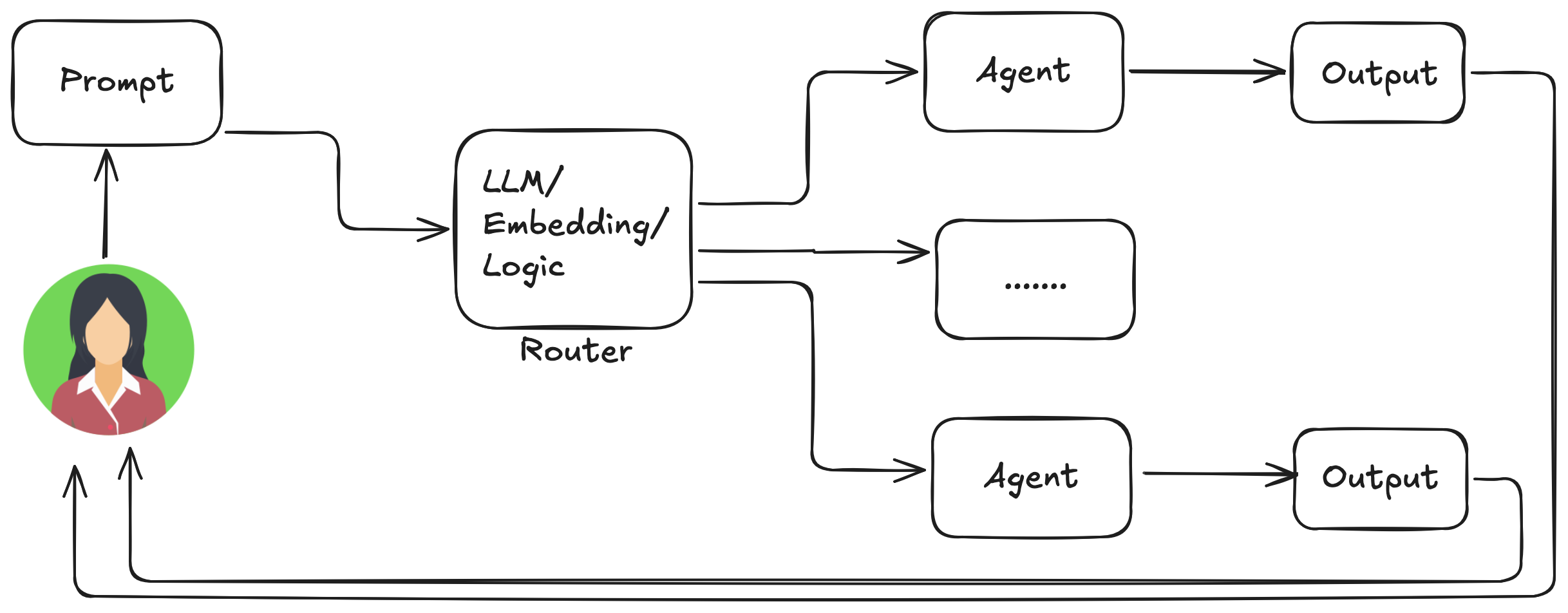
TODO: add the code
4.3 Parallelization
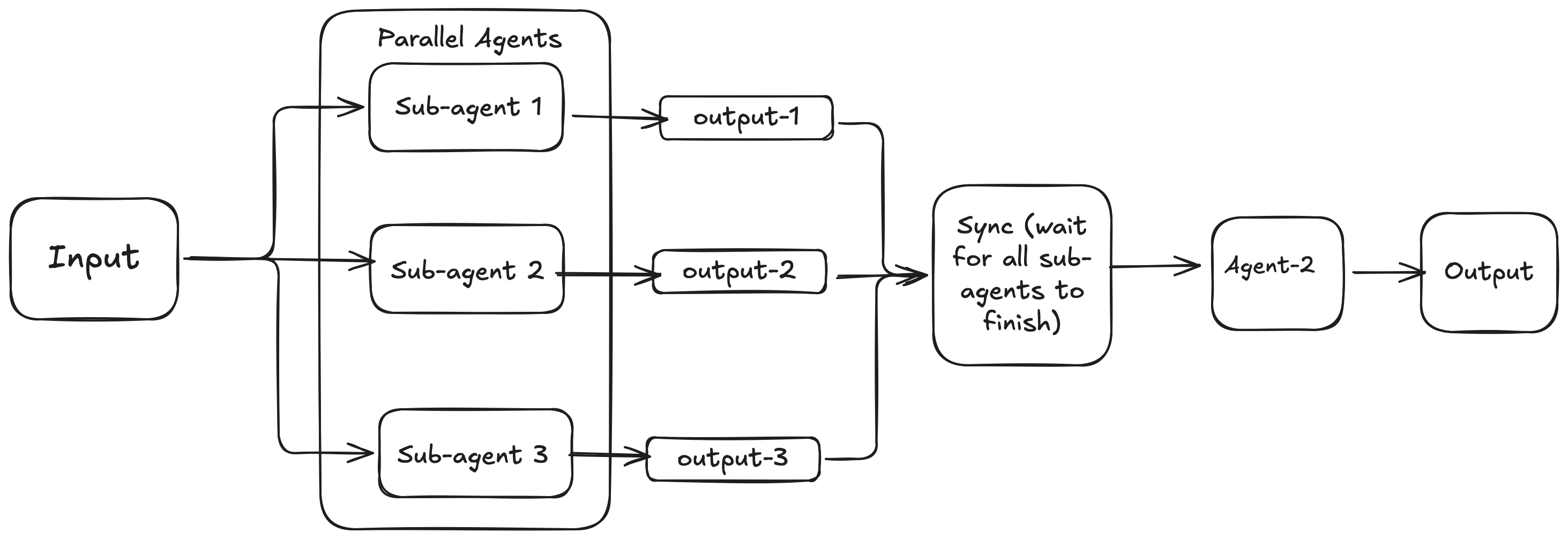
Many complex agentic tasks involve multiple sub-tasks that can be executed simultaneously rather than one after another(The assumption made on prompt chaining and routing patterns). Parallelization involves executing multiple components, such as LLM calls, tool usages, or even the sub-agent invocations concurrently. This can be useful to reduce the e-2e latency where given set of subtask doesn’t have the explicit dependency to one another in the workflow. Implementing parallelization often requires frameworks that support asynchronous execution or multi-threading/multi-processing.
4.4 Reflection and Self-Critique
So far, we’ve explored fundamental agentic patterns: Chaining for sequential execution, Routing for dynamic path selection, and Parallelization for concurrent task execution. However, even with the sophisticated workflows, an agents initial output or plan mightnot be optimal, accurate, or complete. Reflection pattern solves this problem by agent evaluating it’s own work, output, or internal state and using that evaluation to improve its performance or refine its response.
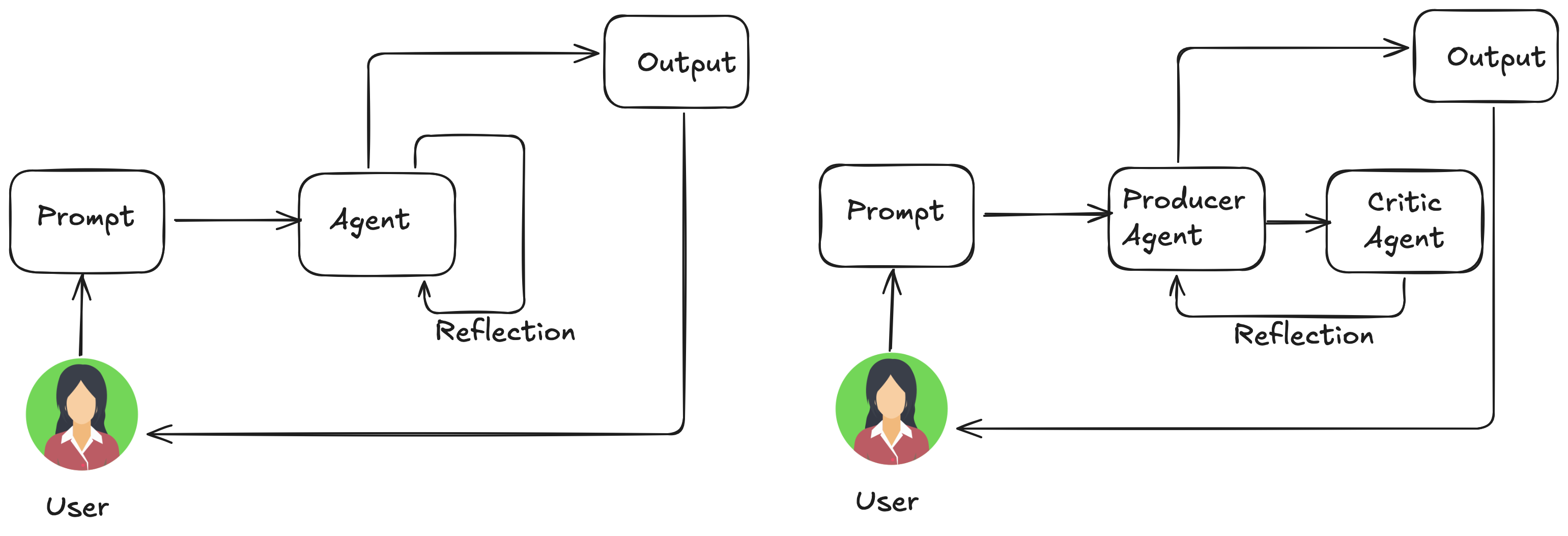
Reflection takes the first step towards self-improving agent by introducing the feedback loop. This process typically involves execution, evaluation or self-critique, and reflection/refinement. Sometimes, there are multiple iterations of execution, evaluation, and refinement untill the satisfactory result is obtained. Oftentime, instead of perfoming self-reflection, the Reflection pattern is implemnted using the Producer Agent and the Critic Agent. This separation of concerns is very helpful in reducing the “cognitive bias” of an agent reviewing it’s own work. Few factors that impact the effectiveness of reflection patterns include “goal setting and monitoring”. A goal provides the ultimate benchmark for the agent’s self evaluation, while monitoring tracks its progress. Furthermore, the effectiveness of the reflection pattern is significantly enhanced when LLM keeps a memory of the conversation. Conversation history provides an important context for the evaluation, allowing agents to assess their output no just in isolation, but with the context of previous interactions, user feedbacks, and evolving goals.
It is important to consider that while the Reflection pattern significantly improves the agents output quality, it comes with significant increase in latency, memory, and LLM token costs. The rule of thumb is to only use Reflection pattern when the quality, accuracy, and detail of the final output are more important than speed and cost.
# CLIENT: The LLM chat endpoint for generating text
def generate_draft(topic: str, model: str = "openai:gpt-4o") -> str:
    prompt = f"""
    You are a domain expert researcher and writer that is able to compile information from multiple veritable sources and write them in an organized manner in an essay. Your job is to write an essay not exceeding 1000 words on the following topic.

    Topic: {topic}
    """
    # Get a response from the LLM by creating a chat with the client.
    response = CLIENT.chat.completions.create(
        model=model,
        messages=[{"role": "user", "content": prompt}],
        temperature=1.0,
    )

    return response.choices[0].message.content

def reflect_on_draft(draft: str, model: str = "openai:o4-mini") -> str:
    prompt = f"""
    Your are a domain expert as well as literary critic who is capable of
    1. Verifying the correctness for both objective statements made as well as the coverage for subjective claims in an essay
    2. Critiquing the writing quality including style, grammars, captivity, etc.
    3. identifying the strengths of the writing and appreciating it as well

    Provide the feedback on following draft of an essay:{draft}
    """

    # Get a response from the LLM by creating a chat with the client.
    response = CLIENT.chat.completions.create(
        model=model,
        messages=[{"role": "user", "content": prompt}],
        temperature=1.0,
    )

    return response.choices[0].message.content

def revise_draft(original_draft: str, reflection: str, model: str = "openai:gpt-4o") -> str:
    prompt = f"""
    You are a domain expert researcher and writer/editor that is capable of looking at the original draft and feedbacks from your peer to improve upon the working draft of an essay. Take the suggestions on the feedback seriously, but do make your own judgement calls to determine the validity of those feedbacks. Do not follow them blindly as commands.

    Here's the original draft: {original_draft}
    Here's the feedbacks from your peer: {reflection}
    """

    # Get a response from the LLM by creating a chat with the client.
    # Get a response from the LLM by creating a chat with the client.
    response = CLIENT.chat.completions.create(
        model=model,
        messages=[{"role": "user", "content": prompt}],
        temperature=1.0,
    )

    return response.choices[0].message.content

essay_prompt = "Should social media platforms be regulated by the government?"
# Agent 1 – Draft
draft = generate_draft(essay_prompt)
print("📝 Draft:\n")
print(draft)

# Agent 2 – Reflection
feedback = reflect_on_draft(draft)
print("\n🧠 Feedback:\n")
print(feedback)

# Agent 3 – Revision
revised = revise_draft(draft, feedback)
print("\n✍️ Revised:\n")
print(revised)
4.5 Tool Calling
So far, our agentic patterns involves the interaction within the agents internal workflow. However, for agents to be truly useful and interact with the real world or external systems, they need the ability to use tools. Tool calling enables an agent to interact with external APIs, databases, services, or even execute code. The LLM at the core of the agent determines when and how to use a specific tool based on user’s request or the current state of the task.
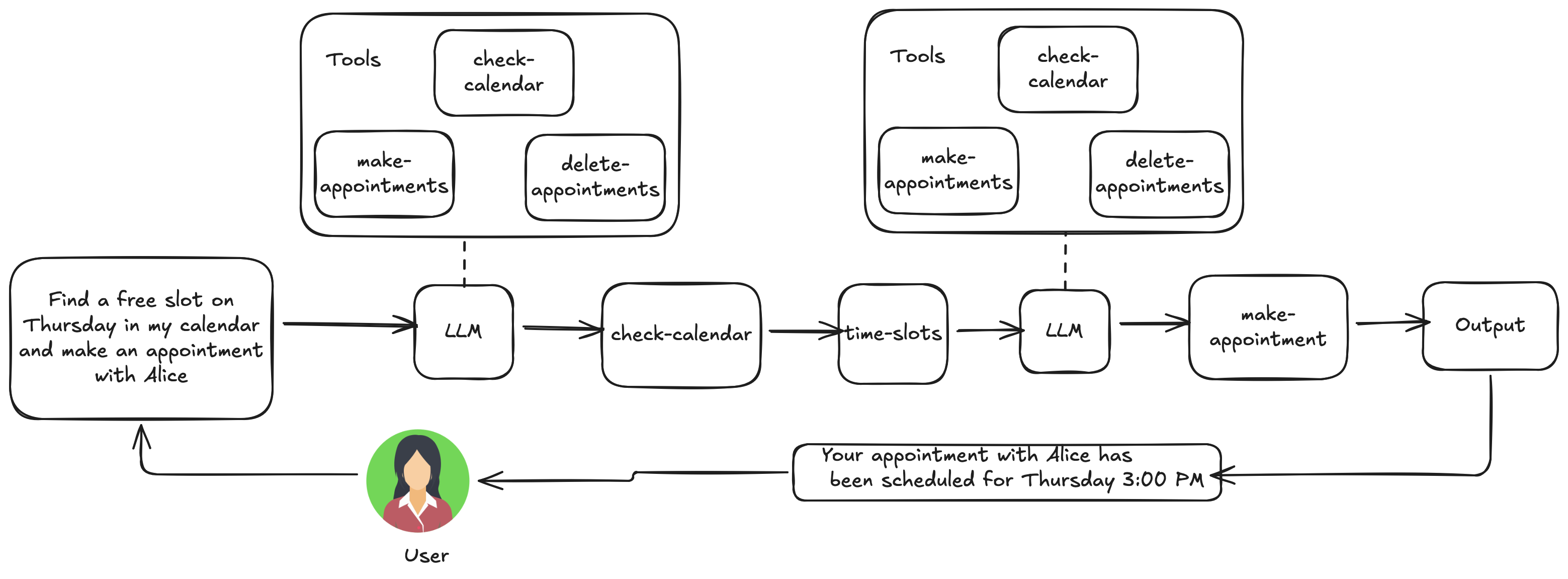
A properly fleshed out “tool calling” enables many capabilities for an agent including:
- Information retrieval from external sources, e.g., weather API that returns current weather conditions
- Interacting with Databases and APIs, e.g., API call to check inventory
- Performing calculations and Data Analysis, e.g., a calculator function, a stock market API, a spreadsheet tool
- Sending communications, e.g., sending emails, messages, or making API calls to external communication services
- Executing code, e.g., A code interpreter
- Controlling Other systems or Devices, e.g., API to control smart home devices
Let’s take an example of Research Assistant agent which will search for materials in different platforms to gather the necessary information. An example of this can be arxiv_search_tool(query, max_results) – a tool that searches for academic papers on given topic in arxiv. First, you need to write the function that will search arxiv for given topic and return top 5 results along with their meta-data.
import xml.etree.ElementTree as ET

import requests
session = requests.Session()

def arxiv_search_tool(query: str, max_results: int = 5) -> list[dict]:
    """
    Searches arXiv for research papers matching the given query.
    """
    url = f"https://export.arxiv.org/api/query?search_query=all:{query}&start=0&max_results={max_results}"

    try:
        response = session.get(url, timeout=30)
        response.raise_for_status()
    except requests.exceptions.RequestException as e:
        return [{"error": str(e)}]

    try:
        root = ET.fromstring(response.content)
        ns = {"atom": "http://www.w3.org/2005/Atom"}

        results = []
        for entry in root.findall("atom:entry", ns):
            title = entry.find("atom:title", ns).text.strip()
            authors = [
                author.find("atom:name", ns).text
                for author in entry.findall("atom:author", ns)
            ]
            published = entry.find("atom:published", ns).text[:10]
            url_abstract = entry.find("atom:id", ns).text
            summary = entry.find("atom:summary", ns).text.strip()

            link_pdf = None
            for link in entry.findall("atom:link", ns):
                if link.attrib.get("title") == "pdf":
                    link_pdf = link.attrib.get("href")
                    break

            results.append(
                {
                    "title": title,
                    "authors": authors,
                    "published": published,
                    "url": url_abstract,
                    "summary": summary,
                    "link_pdf": link_pdf,
                }
            )

        return results
    except Exception as e:
        return [{"error": f"Parsing failed: {str(e)}"}]
Next, we’ll need to explain this function to our agent, which specifies what the function does and what parameters it takes.
arxiv_tool_def = {
    "type": "function",
    "function": {
        "name": "arxiv_search_tool",
        "description": "Searches for research papers on arXiv by query string.",
        "parameters": {
            "type": "object",
            "properties": {
                "query": {
                    "type": "string",
                    "description": "Search keywords for research papers.",
                },
                "max_results": {
                    "type": "integer",
                    "description": "Maximum number of results to return.",
                    "default": 5,
                },
            },
            "required": ["query"],
        },
    },
}
In this manner we can define all the necessary tools for our agent. for axample, another tool can be tavily_search_tool(query, max_results, include_images) – a general web search tool via Tavily. Once we have all the tools defined, the agent’s workflow looks similar to this.
TOOL_MAPPING = {
    "tavily_search_tool": research_tools.tavily_search_tool,
    "arxiv_search_tool": research_tools.arxiv_search_tool,
}

def generate_research_report_with_tools(prompt: str, model: str = "gpt-4o") -> str:
    """
    Generates a research report using OpenAI's tool-calling with arXiv and Tavily tools.

    Args:
        prompt (str): The user prompt.
        model (str): OpenAI model name.

    Returns:
        str: Final assistant research report text.
    """
    messages = [
        {
            "role": "system",
            "content": (
                "You are a research assistant that can search the web and arXiv to write detailed, "
                "accurate, and properly sourced research reports.\n\n"
                "🔍 Use tools when appropriate (e.g., to find scientific papers or web content).\n"
                "📚 Cite sources whenever relevant. Do NOT omit citations for brevity.\n"
                "🌐 When possible, include full URLs (arXiv links, web sources, etc.).\n"
                "✍️ Use an academic tone, organize output into clearly labeled sections, and include "
                "inline citations or footnotes as needed.\n"
                "🚫 Do not include placeholder text such as '(citation needed)' or '(citations omitted)'."
            )
        },
        {"role": "user", "content": prompt}
    ]

    # List of available tools; we use our tool definitions here
    tools = [arxiv_tool_def, tavily_tool_def]

    # Maximum number of turns
    max_turns = 10

    # Iterate for max_turns iterations
    for _ in range(max_turns):
        # let LLM know the available tools and make them choose tools automatically.
        # For more specification on tool usage, read specific LLM providers tool usage guide.
        # For OpenAI: https://platform.openai.com/docs/guides/function-calling#tool-choice
        response = CLIENT.chat.completions.create(
            model=model,
            messages=messages,
            tools=tools,
            tool_choice="auto",
            temperature=1,
        )

        # Get the response from the LLM and append to messages
        msg = response.choices[0].message
        messages.append(msg)

        # Stop when the assistant returns a final answer (no tool calls)
        if not msg.tool_calls:
            final_text = msg.content
            print("✅ Final answer:")
            print(final_text)
            break

        # Execute tool calls and append results into the prompt(context)
        for call in msg.tool_calls:
            tool_name = call.function.name
            args = json.loads(call.function.arguments)
            print(f"🛠️ {tool_name}({args})")

            try:
                tool_func = TOOL_MAPPING[tool_name]
                result = tool_func(**args)
            except Exception as e:
                result = {"error": str(e)}

            # Keep track of tool use in a new message
            new_msg = {
                # Set role to "tool" (plain string) to signal a tool was used
                "role": "tool",
                # As stated in the markdown when inspecting the ChatCompletionMessage object
                # every call has an attribute called id
                "tool_call_id": call.id,
                # The name of the tool was already defined above, use that variable
                "name": tool_name,
                # Pass the result of calling the tool to json.dumps
                "content": json.dumps(result)
            }

            # Append to messages
            messages.append(new_msg)

    return final_text
This function iterates upto max_turns, where in each iteration, the LLM will decide to wither use a tool, or just generate the result. Based on the user request, it’ll choose the tools to run to gather the additional information required for writing the report. The results generated by the tools, e.g., arxiv_search, tavily_search, are then appended to the context so that the LLM can use them to write a report that is grounded on the state of the art research and discussion on the topic.
4.6 Multi-Agent Collaboration
While the monolithic agent architecture can be effective for well-defined problems, it’s capabilities are often constrained when faced with complex multi-domain tasks. The multi-agent collaboration pattern utilizes a cooperative ensemble of distinct, specialized agents. This approach decomposes a high-level objective down into discrete sub-problems, and assigns them to an agent possessing the specific tools, data access, or reasoning capabilities best suited for that task.
For example, a “research report writing” task might be decomposed and assigned to following sub-agents.
- Planning Agent: Creates an outline and coordinates tasks.
- Research Agent: Gathers external information using tools like Arxiv, Tavily, and Wikipedia.
- Writer Agent: Writes the report based on the gathered resources
- Editor Agent: Reflects on the report and provides suggestions for improvement.
You can find the toy implemntation of one such multi-agent workflow here. https://bhattarai-b/assets/research_agent/researcher_multi_agent.ipynb. The efficacy of such multi-agentic system is not only on the smart division of labour, but also dependent on the mechanisms for inter-agent communication. This requires a standardized communication protocol and a shared ontology, allowing agents to exchange data, delegate sub-tasks, and coordinate their actions to ensure that the final output if coherent.
This distributed approach offs several advantages, including enhanced modularity, scalability, and robustness, as the failure of single agent does not necessarily cause a total system failure. The collaboration between agents can take various forms:
- Sequential Handoffs: One agent completes a task and passes its output to another agent for the next step in a pipeline( similar to the planning pattern, but explicitly involving different agents).
- parallel Processing: Multiple agents work on different parts of a problem simulataneously, and their results are later combined.
- Debate and Consensus: Agents with different perspective and information sources engage in discussions to evaluate options, ultimately reaching a concensus or more informed decision.
- Hierarchical Structures: A manager agent might delegate tasks to worker agents dynamically based on their expertise and synthesize their results.
- Expert Teams: Agents with specialized knowledge in different domains( e.g., a researcher, a writer, and an editor) collaborate to produce complex output
- Critic-reviewer: Agents create initial outputs such as plans, drafts and the second group of agents then critically assess theis output for adherence to policies, security, compliance, correctness, quality, and alignment with organizational objectives.
For further readinng on multi-agent systems:
- Multi-Agent Collaboration Mechanisms: A Survey of LLMs: https://arxiv.org/pdf/2501.06322
- Multi-Agent System — The Power of Collaboration https://aravindakumar.medium.com/introducing-multi-agent-frameworks-the-power-of-collaboration-e9db31bba1b6
5. Planning and Orchestration
Think of planning agent as a specialist to whom you delegate a complex task. When you task it with a very open ended request like “organize a corporate retreat for out engineering division”, you are defining the what - the objectives and its constraints– but not the how. This agents core task is to autonomously chart a course to that goal. It must first understand the initial state(e.g., budget, number of participants, desired dates) and a goal (a successfull booking of the event venue), and then discover the optimal sequence of actions to connect them. with the initial plan as the starting point, planning agent must be able to incorporate new information, execution status, and human feedback to steer the process around obstacles.
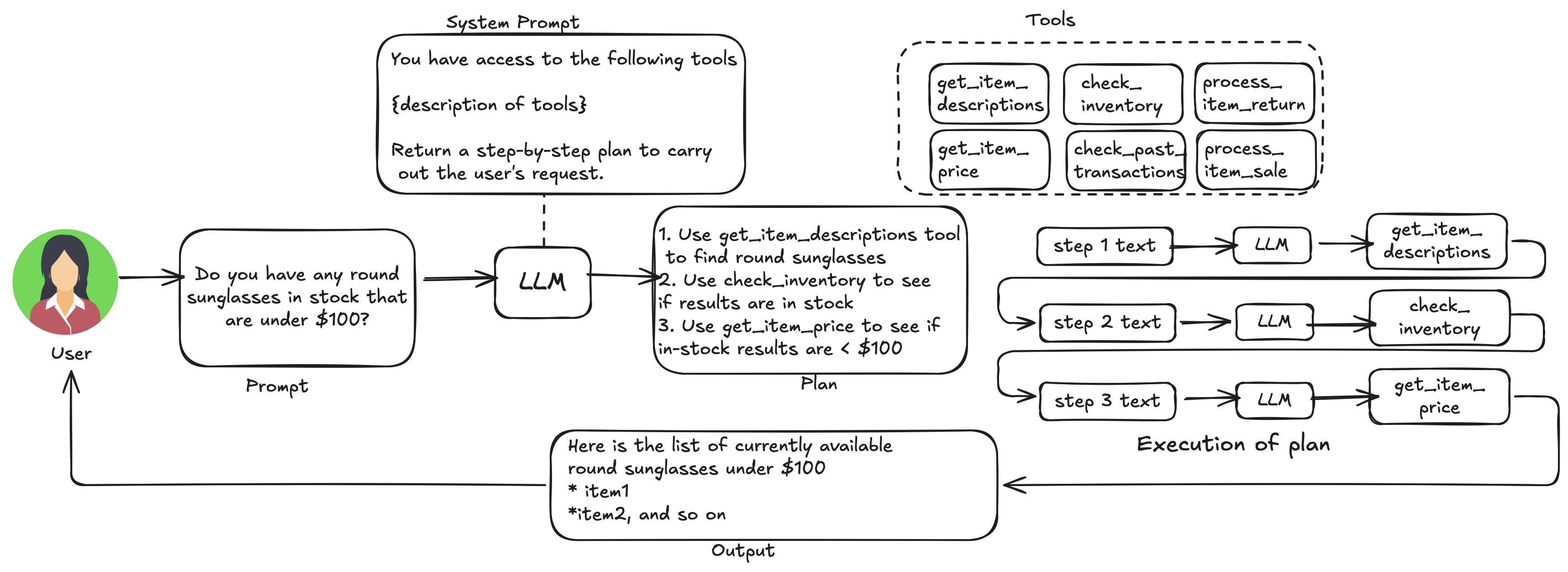
The trade-off to understand here is we are trading predictibility for flexibility. Dynamic planning is a specific tool, but not a universal solution. When a problem workflow is well understood and repeatable, constraining the agent to a well predetermined, fixed workflow is more effective. In addition to being more economic(from token economy standpoint), it reduces the uncertainty and the risk of un-predictable behavior.
It is recommended that the plan are generated in structured format like JSON or better yet as executable script. It has been observed that for complex problems requiring multiple sub-tasks, using executable code as workflow plans usually leads to better performance against plain-text plans and JSON format(Additional reading material: https://arxiv.org/pdf/2402.01030). In addition, the data and control flow are already encoded in the code-plan and you can easily include states as variables when we add memory to the agent (See chapter 3). However, it is necessary to properly sandbox your agent before running the codes orchestrated by planner agents as the mistakes can be costly.
Here is a sample prompt used to create the workflow for managing the inventory and serve user requests.
PROMPT = """You are a senior data assistant. PLAN BY WRITING PYTHON CODE USING TINYDB.

Database Schema & Samples (read-only):
{schema_block}

Execution Environment (already imported/provided):
- Variables: db, inventory_tbl, transactions_tbl  # TinyDB Table objects
- Helpers: get_current_balance(tbl) -> float, next_transaction_id(tbl, prefix="TXN") -> str
- Natural language: user_request: str  # the original user message

PLANNING RULES (critical):
- Derive ALL filters/parameters from user_request (shape/keywords, price ranges "under/over/between", stock mentions,
  quantities, buy/return intent). Do NOT hard-code values.
- Build TinyDB queries dynamically with Query(). If a constraint isn't in user_request, don't apply it.
- Be conservative: if intent is ambiguous, do read-only (DRY RUN).

TRANSACTION POLICY (hard):
- Do NOT create aggregated multi-item transactions.
- If the request contains multiple items, create a separate transaction row PER ITEM.
- For each item:
  - compute its own line total (unit_price * qty),
  - insert ONE transaction with that amount,
  - update balance sequentially (balance += line_total),
  - update the item’s stock.
- If any requested item lacks sufficient stock, do NOT mutate anything; reply with STATUS="insufficient_stock".

HUMAN RESPONSE REQUIREMENT (hard):
- You MUST set a variable named `answer_text` (type str) with a short, customer-friendly sentence (1–2 lines).
- This sentence is the only user-facing message. No dataframes/JSON, no boilerplate disclaimers.
- If nothing matches, politely say so and offer a nearby alternative (closest style/price) or a next step.

ACTION POLICY:
- If the request clearly asks to change state (buy/purchase/return/restock/adjust):
    ACTION="mutate"; SHOULD_MUTATE=True; perform the change and write a matching transaction row.
  Otherwise:
    ACTION="read"; SHOULD_MUTATE=False; simulate and explain briefly as a dry run (in logs only).

FAILURE & EDGE-CASE HANDLING (must implement):
- Do not capture outer variables in Query.test. Pass them as explicit args.
- Always set a short `answer_text`. Also set a string `STATUS` to one of:
  "success", "no_match", "insufficient_stock", "invalid_request", "unsupported_intent".
- no_match: No items satisfy the filters → suggest the closest in style/price, or invite a different range.
- insufficient_stock: Item found but stock < requested qty → state available qty and offer the max you can fulfill.
- invalid_request: Unable to parse essential info (e.g., quantity for a purchase/return) → ask for the missing piece succinctly.
- unsupported_intent: The action is outside the store’s capabilities → provide the nearest supported alternative.
- In all cases, keep the tone helpful and concise (1–2 sentences). Put technical details (e.g., ACTION/DRY RUN) only in stdout logs.

OUTPUT CONTRACT:
- Return ONLY executable Python between these tags (no extra text):
  <execute_python>
  # your python
  </execute_python>

CODE CHECKLIST (follow in code):
1. Parse intent & constraints from user_request (regex ok).
2. Build TinyDB condition incrementally; query inventory_tbl.
3. If mutate: validate stock, update inventory, insert a transaction (new id, amount, balance, timestamp).
4. ALWAYS set:
   - `answer_text` (human sentence, required),
   - `STATUS` (see list above).
   Also print a brief log to stdout, e.g., "LOG: ACTION=read DRY_RUN=True STATUS=no_match".
5. Optional: set `answer_rows` or `answer_json` if useful, but `answer_text` is mandatory.

TONE EXAMPLES (for `answer_text`):
- success: "Yes, we have our Classic sunglasses, a round frame, for $60."
- no_match: "We don’t have round frames under $100 in stock right now, but our Moon round frame is available at $120."
- insufficient_stock: "We only have 1 pair of Classic left; I can reserve that for you."
- invalid_request: "I can help with that—how many pairs would you like to purchase?"
- unsupported_intent: "We can’t refurbish frames, but I can suggest similar new models."

Constraints:
- Use TinyDB Query for filtering. Standard library imports only if needed.
- Keep code clear and commented with numbered steps.

User request:
{question}

"""
Here’s a typical routine to generate a workflow by taking in the user request as prompt.
def generate_llm_code(
    prompt: str,
    *,
    inventory_tbl,
    transactions_tbl,
    model: str = "gpt-4.1-mini",
    temperature: float = 0.2,
) -> str:
    """
    Ask the LLM to produce a plan-with-code response.
    Returns the FULL assistant content (including surrounding text and tags).
    The actual code extraction happens later in execute_generated_code.
    """
    schema_block = inv_utils.build_schema_block(inventory_tbl, transactions_tbl)
    prompt = PROMPT.format(schema_block=schema_block, question=prompt)

    resp = client.chat.completions.create(
        model=model,
        temperature=temperature,
        messages=[
            {
                "role": "system",
                "content": "You write safe, well-commented TinyDB code to handle data questions and updates."
            },
            {"role": "user", "content": prompt},
        ],
    )
    content = resp.choices[0].message.content or ""

    return content
When we call this function with a specific user request like this
# Andrew's prompt from the lecture
prompt_round = "Do you have any round sunglasses in stock that are under $100?"

# Generate the plan-as-code (FULL content; may include <execute_python> tags)
full_content_round = generate_llm_code(
    prompt_round,
    inventory_tbl=inventory_tbl,
    transactions_tbl=transactions_tbl,
    model="o4-mini",
    temperature=1.0,
)

# Inspect the LLM’s plan + code (no execution here)
utils.print_html(full_content_round, title="Plan with Code (Full Response)")
The output you get from this function invocation is executable python script like below.
<execute_python>
#1. Import necessary modules
from tinydb import Query

#2. Parse constraints from user_request
import re
request = user_request.lower()

# Shape constraint
shape = None
if 'round' in request:
    shape = 'round'

# Price constraint
price_max = None
m = re.search(r'under\s*\$?(\d+)', request)
if m:
    price_max = float(m.group(1))

# In-stock constraint
in_stock_required = 'in stock' in request or 'available' in request

#3. Build TinyDB query condition incrementally
Item = Query()
condition = None

# Quantity in stock > 0 if requested
if in_stock_required:
    condition = (Item.quantity_in_stock > 0)
# Price upper bound
if price_max is not None:
    cond_price = (Item.price < price_max)
    condition = cond_price if condition is None else (condition & cond_price)
# Shape filter on name or description
if shape:
    cond_shape_name = Item.name.test(lambda x, s=shape: s in x.lower())
    cond_shape_desc = Item.description.test(lambda x, s=shape: s in x.lower())
    cond_shape = cond_shape_name | cond_shape_desc
    condition = cond_shape if condition is None else (condition & cond_shape)

#4. Execute search
results = inventory_tbl.search(condition) if condition is not None else []

#5. Formulate response
if results:
    # Success: list matching items
    # Build a string like "Classic ($60)" for each
    items_str = ', '.join(f"{item['name']} (${item['price']})" for item in results)
    answer_text = f"Yes, we have {items_str} in stock."
    STATUS = "success"
else:
    # No match: find alternative round frames regardless of price but in stock
    alt_condition = None
    if shape:
        cond_alt_shape = Item.name.test(lambda x, s=shape: s in x.lower()) | \
                         Item.description.test(lambda x, s=shape: s in x.lower())
        alt_condition = (Item.quantity_in_stock > 0) & cond_alt_shape
    alt_items = inventory_tbl.search(alt_condition) if alt_condition is not None else []
    if alt_items:
        # choose item with minimal price difference above or any
        # compute closest to price_max
        alt = min(alt_items, key=lambda it: abs(it['price'] - (price_max or it['price'])))
        answer_text = (f"We don’t have round frames under ${int(price_max)} in stock right now, "
                       f"but our {alt['name']} round frame is available at ${alt['price']}.")
    else:
        # no alternative found
        answer_text = ("We don’t have round sunglasses in stock at the moment; "
                       "would you like to check another style or price range?")
    STATUS = "no_match"

#6. Log the action
print(f"LOG: ACTION=read DRY_RUN=True STATUS={STATUS}")
</execute_python>
6: Model Control Protocols (MCP)
As discussed, to enable the agents capability beyond multimodal generation, interaction with external environment is necessary, including access to current data, utilization of external software, and execuiton of specific operational tasks. Model Control Protocol(MCP) statndardizes this iterface to enable consistent and predictable integration (https://www.anthropic.com/news/model-context-protocol). It is an open standard that enables developers to build two-way connections between their data sources and AI-powered tools. With this architecture, you can either expose your data through MCP servers or build AI applications(MCP clients) that connect to these servers (https://www.youtube.com/watch?v=N3vHJcHBS-w )
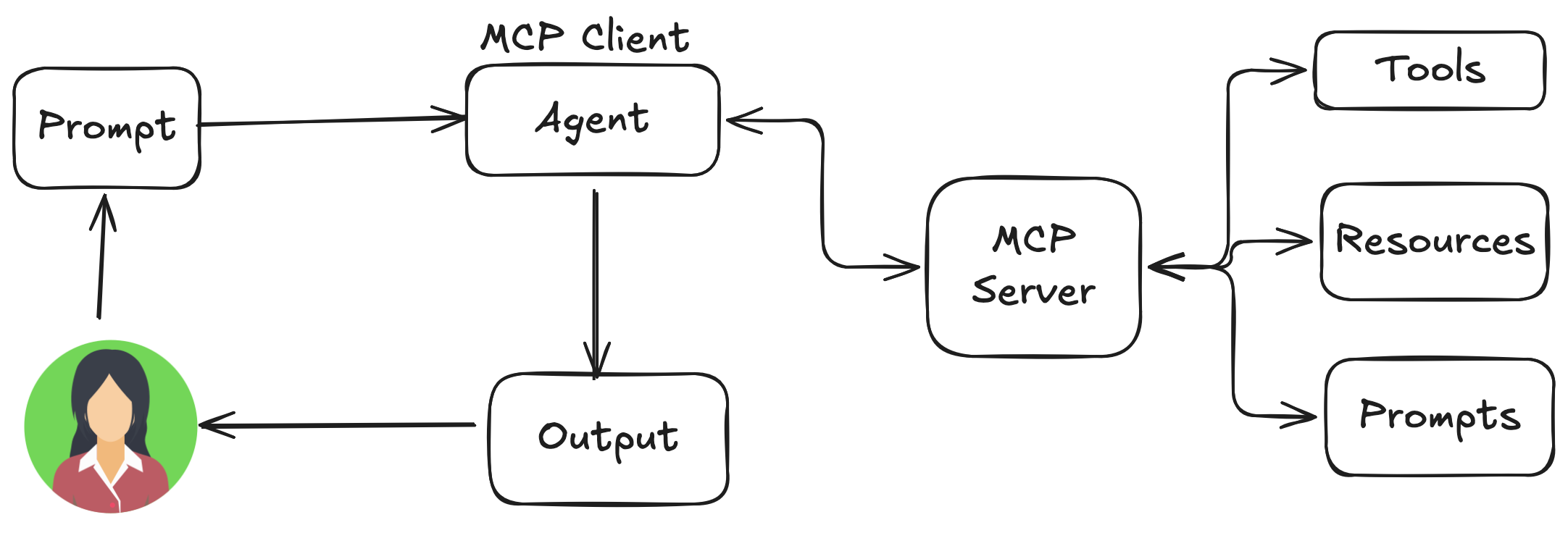
The Model Control Protocol (MCP) is not an agent framework, it doesnot plan, reason, or orchestrate by itself. It is a standardized boundary between the agent/orchestrator and external capabilities beyond the ownership scope of agent. MCP’s real value is in managing the organizational boundaries, security & access control, capability ownership, and explicit context injection. In contrast to tightly coupled, in-house tool_calling pattern, MCP standardizes the integration with capabilities managed by external team. Three major components of MCP servers are
- Tools: Functions that the LLM can actively call, and decides when to use them based on user requests. Tools can write to databases, call external APIs, modify files, etc.
- Resources: Passive data sources that provide read-only access to information for context. The resources are accessed by agentic workflow (application) to append the context before triggering generation request to LLMs.
- Prompts: Pre-built instruction templates that tell the model to work with specific tools and resources. These are written by domain experts and injected in the LLM prompt by agentic workflows
| Concept | Decided by | Purpose |
|---|---|---|
| Resource | Orchestrator | Context / observation |
| Tool | LLM | Action |
| Prompt | Orchestrator / Planner / Human | Procedure / playbook |
| MCP Server | Capability owner | Boundary & contract |
| MCP Client | Agent system | Consumption & control |
Here’s a toy implementation of MCP server that echoes the message sent by the client.
from fastmcp import FastMCP

# Create server
mcp = FastMCP("Echo Server")


@mcp.tool
def echo_tool(text: str) -> str:
    """Echo the input text"""
    return text


@mcp.resource("echo://static")
def echo_resource() -> str:
    return "Echo!"


@mcp.resource("echo://{text}")
def echo_template(text: str) -> str:
    """Echo the input text"""
    return f"Echo: {text}"


@mcp.prompt("echo")
def echo_prompt(text: str) -> str:
    return text

if __name__ == "__main__":
    mcp.run()
You can interact with this server using a client like this.
import asyncio
from fastmcp import Client

async def main():
    # Start your server via stdio transport
    async with Client(
        {
            "mcpServers": {
                "echo": {
                    "transport": "stdio",
                    "command": "python",
                    "args": ["server.py"],
                }
            }
        }
    ) as client:

        # List capabilities
        tools = await client.list_tools()
        resources = await client.list_resources()
        prompts = await client.list_prompts()

        print("Tools:", [t.name for t in tools])
        print("Resources:", [r.uri for r in resources])
        print("Prompts:", [p.name for p in prompts])

        # Call your tool
        res = await client.call_tool("echo_tool", {"text": "hello MCP"})
        print("Echo tool result:", res)

        # Read a static resource
        static = await client.read_resource("echo://static")
        print("Static resource:", static)

        # Read the templated resource
        templated = await client.read_resource("echo://world")
        print("Templated resource:", templated)

if __name__ == "__main__":
    asyncio.run(main())
You get following outputs. As you can see we can get the available tools, resources, and prompts as well as invoke any of these components from client residing within agentic workflow.
Tools: ['echo_tool']
Resources: [AnyUrl('echo://static')]
Prompts: ['echo']
Echo tool result: CallToolResult(content=[TextContent(type='text', text='hello MCP', annotations=None, meta=None)], structured_content={'result': 'hello MCP'}, meta=None, data='hello MCP', is_error=False)
Static resource: [TextResourceContents(uri=AnyUrl('echo://static'), mimeType='text/plain', meta=None, text='Echo!')]
Templated resource: [TextResourceContents(uri=AnyUrl('echo://world'), mimeType='text/plain', meta=None, text='Echo: world')]
7. Evaluation of Agentic Workflows
When building an agentic system, it’s hard to know where it works and where it won’t work. Instead of spending long-hours theorizing whether or not a particular approach work for a problem or not, it is better to build a quick and dirty system and iterate upon it to make it better.
One of the most practical way to approach early stage evaluation is hand-crafting a ground truth set and performing inspection of workflow’s performance on that dataset. For e.g., in our invoice processing system, we can manually extract the required field from test set and compare them against the agent generated records. If we get plenty of records that has mixed-up dates, we know that is something we should focus on evaluation.
Here’s a toy guideline on how we can formulate this evaluation.
- Manually extract due dates from test-sets invoices “December 29, 2025” -> “2025/12/29”
- Direct LLM to return dates in specific formate. “… Format due date as YYYY/MM/DD”
- Extract data from LLM response using code
 date_pattern = r'\d{4}/\d{2}/\d{2}'
 extracted_date = re.findall(date_pattern, llm_response)
- Compare LLM result to ground truth
if (extracted_date == actual_date):
 num_correct += 1
</list>
After building such evaluation harness, monitor as you make changes to the workflow( e.g., prompt update, new algorithms) and see if the metric improves. Based on the outputs of your agentic workflow, your evaluation harness may have to adapt. Based on whether you have per-example ground truth or not, and whether you have objective metric to compute or not, we can adopt different evaluation methodology. A typical evaluation approach matrix is shown below.
| Evaluate with code (Objective metrics) | LLM as a Judge (Subjective metrics) | |
|---|---|---|
| Per-example ground truth | e.g., Extract date from invoices if extracted_date == ground_truth: num_correct += 1 | e.g., research material gathering Count the gold-standard talking points on the following text |
| No per-example ground truth | e.g., Generate Instagram captions for products if len(caption) < 10: num_correct += 1 | e.g., chart generation for data visualization Evaluate the given chart based on the following rubrics: 1. the axes have clear labels |
Component-Level vs End-to-End Evals
After implementing end-to-end result evals(For e.g., the resultant essay on the research assistant agent), it is good idea to implement the evaluation metrics for individual components of agentic workflow. This finer-grained evaluation serves 2 purposes.
First, if the problem lies in a particular component, e.g., the web search (usually the first step in research assistant agentic workflow), rerunning the entire pipeline (search → draft → reflect) every time we update this component is expensive. By strictly focusing on a single component, we get clear idea of whether that part of pipeline is improving or not. Relying on e2e evaluation can ignore the small improvements you make on the component as results can get muddied by the randomness introduced by the later components.
Second, component-level evals are also efficient when multiple teams are working on different pieces of a system: each team can optimize its own component using a clear metric, without needing to run or wait for full end-to-end tests.
8. Control, Termination, and Budgets
Now we introduce the evaluation metrics for our e2e systems as well as individual components or sub-systems, we can use these informations along with problem-specific heuristics to control the behavior of an agent.
8.1 Success Criteria: Goal Setting
Important part of running a useful agentic system is for it to understand when it has completed it’s objective. A clear measurable goal allows user to produce explicit completion signal and terminate the process. We do not want to put our Agent through “The Infinite Loop of Doom.” The way to avoid this trap is to define the “Good Enough” presults programmatically and embed them in the workflow.
- Weak Condition: “The LLM says it is done.” (Risky. It might lie.)
- Strong Condition: “The unit tests pass” or “The generated JSON parses correctly.”
# The Evaluation drives the Control Flow
while True:
    draft = agent.write()
    score = judge.evaluate(draft)  # The Metric

    if score >= 4.5:
        return draft  # Success
    elif score < 3.0:
        agent.history.append("Critique: Too informal. Rewrite.") # Feedback
    else:
        agent.history.append("Critique: Good, but fix the typo in para 2.")
When implementing the success criteria, never let the loop run on “vibes.” Require a specific artifact (a file, a function return value) to trigger the break statement.
8.2 Termination Logic
This is a “watchdog” layer that sits outside of LLM and makes sure the agent is working towards the intended goal. If the completition signal cannot be triggerred within reasonable amount of time or attempts, it’ll trigger these kill-switches to terminate the agents. This can be a Hard Limit(Safety net), e.g., MAX_STEPS = 10. If it hits 10, kill it. Oftentimes, it is better to return an error than a $50 bill. Alternatively, it can be Soft Limits(Velocity Check) logics like:
- Stalemate Detection: If the agent has called search_google(“error in python code”) 3 times in a row with the exact same query, it is stuck. Kill it.
- Oscillation Detection: If the state flips from plan_A to plan_B back to plan_A, it is looping. Kill it.
8.3 Cost, Latency, and Token Budgets
Oftentimes, the focus when you are developing the agentic workflow to solve a problem is on delivering the high quality outputs. But if we are to deploy that solution on real world, the cost optimization is non-negotiable. There is many ways to reduce the latency of the workflow as it is built using a wide range of tools and services.
Profile your application (where is the time going?): Before you optimize, you must understand where the time is being spent. In an agentic workflow, latency is usually bursty. We need to time each component in workflow to understand where is the largest potential for latency reduction. e.g., waterfall chart that breakdowns the time spent by web_search, web_fetch, and write_report in research assistant agent
Look for parallelization and asynchronous execution opportunities in the workflow. For e.g., if our research assitant fetches 5 different documents and summarizes them, it’s probably okay to process those 5 documents in parallel. If we are waiting for a slow tool to return, but there are some tasks we can perform without it’s result, we can include async calls in the workflow.
Look for Batching Opportunities For e.g., if you need stock prices for AAPL, MSFT, and GOOG, teach agent to batch them when making tool call. that way we can reduce 3 LLM round-trips to 1.
Perform Deterministic Short-circuits when possible. If certain task doen’t require LLM invocation for reasonable performance, don’t. It’ll save a lot of tokens and time. For e.g., we can have simple regex match and responses for normal greeting instead of always invoking LLM
- Understand cost models for underlying components. For determning the most economic option, understand the cost model of your LLM provider(cost/token, cost/api_calls, flat fee) and in-house deployment (server cost, energy cost, etc.) If LLM steps too long or if tokens prices are too expensive, try smaller/less intelligent models or faster LLM Providers, or use in-house LLM endpoints when feasible (I am going to do a similar writeup on how to optimize your in-house LLM inference). Same goes for other 3rd party services like Retrieval and Vector DB, APIs, SW packages.
- Dynamic service selection to meet cost/performance SLAs. Not every query will need state-of-the-art most expensive models. Understanding the pricing models allow you to implement cost saving measures like (1) speculative paths (use cheap model for all task, escalate to expensive only when needed), or (2) service routing(swap models and components based on service level(free tier goes to cheap slow services)).
- Paying attention to Context(and token) economy provides the biggest lever for cost saving. As we record the state for our agentic workflow, the context size explodes as we loop through it. There are several ways you can manage this to save cost on your LLM endpoint. For e.g., Prompt caching:, cache the prefix to avoid paying repetitive price on fixed system prompt( adhere to static prefix + dynamic prompt structure), context pruning: when the context gets too big, trigger a summarization to compress it down or use sliding window approach (keep context from last 5 loops only).
9. Debugging Agentic Workflows
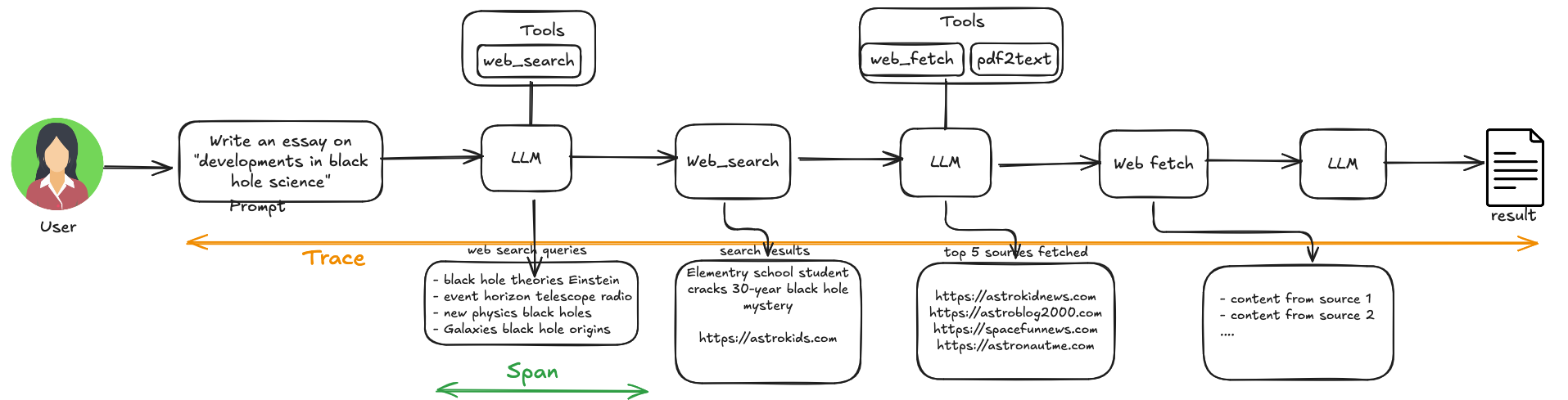
With the evaluation mechanisms we developed in chapter 6, we should be able to detect when our agentic workflow incurs the soft or hard failures. In order to properly debug and fix the issues, we’ll need to look into the execution trace of the failed requests. Tracing is the process of recording the states needed for debugging these failures.
9.1 Tracing and Observability
Tracing involves feeding example inputs to agentic workflow and observing the decisions, tool calls, and intermediate results produced by different components along the process. The collection of these informations collected for all steps in the workflow is called trace. The information captured for an individual component is called span. A rule of thumb is to capture traces for usecases where the workflow doesn’t perform as expected. When the result for a particular input is unsatisfactory, we can look at the trace and span of that input and look for components not performing as expected. Here’s the example capture from research assistant agent.
9.2 Replay
A production-grade agent framework must support a ‘Resume’ feature. If a 50-step workflow fails at step 49, you must be able to load the state of step 49 from the captured trace and debug just that step. If you have to re-run all 48 steps to get back to the failure, the iteration loop becomes too slow and expensive. Replay functionality enables this.
Scenario 1: Deterministic Replay
Lets say one of your run failed with a bug in your code (e.g., your JSON parser crashed because the LLM returned invalid JSON). If you just rerun the workflow, the LLM might return valid JSON this time, and the bug disappears (“Heisenbug”). You can’t fix what you can’t reproduce.
With trace capture and replay, we can avoid such situation. Lets say update your json parser with potential fix. You can test your update as follows:
- Load the State from Step before the json parsing happens
- Mock the LLM: inject the exact string recorded in the Trace in place of LLM endpoint call
- Run your JSON parsing logic
This enables you to reproduce the crash 100% of the time, allowing you to patch your parser and test reliably.
# DETERMINISTIC REPLAY (Mocked)
# We load the state, but we DO NOT call the network.

state = load_checkpoint(step=3)
cached_bad_response = trace.get_output(step=3) # "{ 'key': 'oops " <--- The broken string

# We run ONLY the code we are fixing
try:
    # We loop here, changing THIS function until it handles the bad string
    result = my_robust_json_parser(cached_bad_response)
    print("Success! Parser is fixed.")
except Exception:
    print("Parser still crashed.")
Scenario 2: Forked Replay (The “Time Travel” Pattern)
This is used to produce a different execution paths while maintaining a fork point. Let’s say after a failure you observe that your parsing code is fine; the LLM failed to follow instructions and you need to yell at the LLM. You change the system prompt to say: “IMPORTANT: Do not wrap JSON in markdown backticks!”
During the replay: You reload the state, but this time you let the Agent call LLM endpoint again with the new prompt. The LLM (hopefully) outputs clean JSON, and your original parser works without modification.
# FORKED REPLAY (Live)
# We load the state, change the prompt, and CALL the network.

state = load_checkpoint(step=3)
state.system_prompt += " IMPORTANT: Don't forget to cite sources." # <--- The Fix

# We run the AGENT LOOP again
# This hits the OpenAI API and gets a NEW string
new_response = llm_engine.generate(state)

if "Source:" in new_response:
    print("Success! The prompt fix worked.")
else:
    print("Failed. The model still ignored instructions.")
9.3 Error Attribution
For soft failures, i.e., the system produces the result but they are not of desired quality, we might need error attribution to improve the system quality. We can utilize the per-component evals in section 6 for identifying the components where most of the error happens. However, developing s comprehensive evaluation suite for each component from the beginning might not be feasible. For initial stage of development, we can manually observe the trace and identify the errors one by one and record them.
| Prompt | Search terms | Search results | Identifying top 5 resources | … | … |
|---|---|---|---|---|---|
| recent developments in black hole science | too many blog posts, not enough research papers | ||||
| renting vs buying a home in Seattle | Missed well known blog | ||||
| Robotics for agricultural harvesting | terms too generic | Articles for elementary school students | |||
| … | … | ||||
| Batteries for electric vehicles | only non-us companies included | missed a magazine | |||
| % of failures | 5% | 45% | 10% | … | … |
Once we have such empirical attributions, it is quite clear that we need to focus first on fixing the web_search by tuning the LLMs web search prompts. As the system matures, we can develop more automated systems for error attribution by developing a comprehensive evals like we discussed in chapter 7.
10. Failure Recovery and Robustness
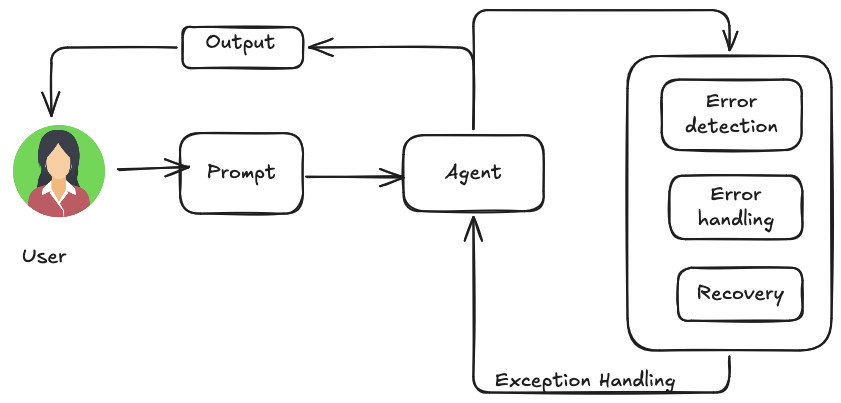
For an AI agent to work on real world, it must be able to navigate unforseen situations, errors, and malfunctions. we achieve this by developing exceptionally durable and resiliant agents that can maintain uninterrupted functionality and operational integrity despite various difficulties and anomalies. Exception handling includes (1) Error detection: identifying operational issues when they arise. This can come as invalid/malformed output format, API errors such as 404(not found) or 500(Internal Server Error), unusual delays, or nonsensical responses. In addition it can involve proactive approaches like operational anomaly detection, and continuous monitoring to catch errors before they escalate. (2) Error Handling: includes meticulously logging the error messages so that they can be used for later debugging. For transient errors, it can have mechanisms to apply minor changes and retrying the process, or reverting the system to soft failue(part of the results are correct). It’s also useful to generate alert so that the concern parties (humans, another agent) can intervene (3) Recovery: handles the necessary steps to bring back system to regular operation after failure happens. This may include actions like rolling back the recent changes, root-causing the error for correcting the system, or employing another Agent to fix the erronous workflow.
11. Human-in-the-Loop and Trust Boundaries
Human-in-the-Loop(HITL) pattern puts humans alongside the agent in the workflow such that the necessary workflow go through the humans. In addition to improving the accuracy of agentic workflows, HITL pattern allows us to build agentic workflows for sensitive areas where fully autonomous Agent are not permitted. The human on the question can come in one of many roles:
- Human Oversight: human will look into the processs/output to adhere to guidelines and avoid undesireable outputs
- Intervention and Correction: when the agent gets hard or soft error, human can jum in to rectify the process, supply additional context, etc.
- Human Feedback: human feedback is used to improve the model, e.g., RLHF
- Decision Augmentation: AI provides analysis and recommendations to human, which improves the decision making capability
- Human-Agent Collaboration: both human and Agent contribute to their strength to solve the larger problem
- Escalation Policies: a set of rules decide when the decision making agency should be raised escalated from Agent to human.
Once caveat with Human-in-the-loop pattern is it is not as scalable as the Agents. An Agent can do many things with reasonable accuracy, whereas we need humans with particular skillsets in order to make the HITL workflow pattern for given problem to be functional. The idea is to include humans only when necessary and scale the less sensitive tasks with highly scalable agents. Here’s an example of AI agent that handles technical support and escalates issues to human in the loop using tickets when necessary.
# Placeholder for tools (replace with actual implementations if needed)
def troubleshoot_issue(issue: str) -> dict:
    return {"status": "success", "report": f"Troubleshooting steps for {issue}."}

def create_ticket(issue_type: str, details: str) -> dict:
    return {"status": "success", "ticket_id": "TICKET123"}

def escalate_to_human(issue_type: str) -> dict:
    # This would typically transfer to a human queue in a real system
    return {"status": "success", "message": f"Escalated {issue_type} to a human specialist."}

technical_support_agent = Agent(
    name="technical_support_specialist",
    model="gpt4-o",
    instruction="""
    You are a technical support specialist for our electronics company. FIRST, check if the user has a support history in state["customer_info"]["support_history"]. If they do, reference this history in your responses.
    For technical issues:
    1. Use the troubleshoot_issue tool to analyze the problem.
    2. Guide the user through basic troubleshooting steps.
    3. If the issue persists, use create_ticket to log the issue.
    For complex issues beyond basic troubleshooting:
    1. Use escalate_to_human to transfer to a human specialist.
    Maintain a professional but empathetic tone. Acknowledge the frustration technical issues can cause, while providing clear steps toward resolution.
    """,
    tools=[troubleshoot_issue, create_ticket, escalate_to_human]
)

def personalization_callback( callback_context: CallbackContext, llm_request: LlmRequest
) -> Optional[LlmRequest]:
    """Adds personalization information to the LLM request."""
    # Get customer info from state
    customer_info = callback_context.state.get("customer_info")
    if customer_info:
        customer_name = customer_info.get("name", "valued customer")
        customer_tier = customer_info.get("tier", "standard")
        recent_purchases = customer_info.get("recent_purchases", [])
        personalization_note = (
            f"\nIMPORTANT PERSONALIZATION:\n"
            f"Customer Name: {customer_name}\n"
            f"Customer Tier: {customer_tier}\n"
        )
        if recent_purchases:
            personalization_note += f"Recent Purchases: {','.join(recent_purchases)}\n"

        if llm_request.contents:
            # Add as a system message before the first content
            system_content = types.Content(role="system", parts=[types.Part(text=personalization_note)])
            llm_request.contents.insert(0, system_content)

    return None # Return None to continue with the modified request
12. Production Considerations
In production, the enemy is Entropy. The model changes, the tools change, and the data changes. A good agentic workflow mustnot break when there are changes on some of the underlying conditions.
12.1 Non-Determinism and Drift
Traditional software usually breaks because someone changes the code. AI breaks because world changed (or OpenAI changed their model weights).
- The “Model Drift”
- Problem: You use a generic tag
gpt-4. On Tuesday, OpenAI pushed a silent update. Suddenly, my agent stopped formatting JSON correctly - Solution: Always Pin Versions. Never use just
gpt-4, orclaude-3.5-sonnet. Use the exact version, e.g.,gpt4-4-0613orclaude-3.5-sonnet-20240620. Treat the model version like dependency on the software stack, never upgrade in production before validating.
- Problem: You use a generic tag
- Prompt drift
- Problem: Prompts don’t drift, they rot. A prompt that works for 90% of the cases might fail because the use rbehavior changes(e.g., uses upped the typical CSV file size by 5x)
- Solution: Continuous evaluation- the eval techniques we developed in chapter 7 aren’t just for development, it’s for monitoring as well. You can run a small fraction (e.g. 1%) of the production logs through ‘LLM as a judge’ daily. If the score drops, you can detect the shift early.
12.2 Tool and Schema Versioning
Agents are probably the most fragile clients of any API. Any minor change on them can cause the workflow to suffer catastrophically. Consider a scenario:
- Problem: The agent uses a tool
get_customer_data(id). The backend team changed the API to requireget_customer_data(id, region), but the agent keeps on calling the old signature. It either hallucinates the region or crashes the program. - Solution: Add a adapter layer. Never auto-generate the tool definitions from your internal API code. Instead, maintain a separate “Agent Interface Layer”, that translates the API calls from agent to backend until the tool definitions are properly updated.
"""
The "Adapter Pattern" for Tools
The INTERNAL API (Changes often, strict)
"""
def _internal_search_api(query, region, sort_by, limit):
    # complex logic...
    pass

"""
The AGENT TOOL (Frozen, tolerant)
We map the Agent's simple view to the complex internal view.
"""
class SearchTool(BaseTool):
    name = "search"
    description = "Finds documents. Input: query string."

    # Schema versioning: This JSON schema stays constant even if backend changes
    args_schema = SearchInputV1

    def _run(self, query: str):
        # ADAPTER LOGIC:
        # We default the new parameters so the Agent doesn't need to know about them yet.
        return _internal_search_api(
            query=query,
            region="US",   # Defaulted
            sort_by="date",# Defaulted
            limit=5
        )
12.3 Operational Constraints
Your agent is a while loop with a credit card. So you need to contain it.
- Rate limits(The “throttling” Layer):
- Problem: An agent loop is faster than a human. It can hit an API 50 times in 10 seconds, triggering a ban from Salesforce/Github.
- Solution: The tool execution layer must have a global rate limiter. If
tool_calls > 10/minute: sleep().
- Isolation and safety
- Problem: The disadvantage of having autonomous agent is sometimes it can make a costly mistakes
- Solution: Never
exec()on local system. Always use specialized sandboxes, e.g., E2B, Docker containers, Firecracker MicroVMs. Treat the generated codes as radioactive waste, handle them in a led-lined box, not on the main server.
13. Closing Thoughts
This has been quite a learning, and there is still so much I am still exploring, but these notes at least got me thinking a bit more structurally when I’m trying to build the Agentic systems instead of flailing around. None of the content here are revolutionry and wildly novel(a lot comes from the AI practitioners experimenting with the curiosity that I honestly lack sometimes), yet they collectively end up making systems so capable, I am out of words.
If I understood anything, building an agent isn’t about teaching a computer to think. It’s about building a Cognitive Control System. You define the Goal (Ch 7), you build the Sensors (Ch 6), you design the Actuators (Ch 3), and you install the Safety Switches (Ch 12). The ‘Intelligence’ is just the electricity running through the wires. The System is what delivers the value.
I have few additional topics below that I though were important for advanced Agentic workflows. But their importance migh change quickly as the models, services, and Agentic frameworks change. And finally, I will keep refining these notes whenever I can. These are not supposed to be organized cookbook, tutorial or book(There are much better materials out there). These are just the rambling that helped me to keep my thoughts a bit organized. So don’t take anything in face value.
A Additional Topics
A.1 Self Improving Agents
A.2 Guardrail-First Agents
Guardrails (or Safety Patterns) are crucial mechanisms that ensure intelligent agents operate safely, ethically, and as intended, particularly as the agents become more autonomous and embedded into critical systems. They can generate harmful, biased, unethical, or factually incorrect outputs, potentially causing the-real world damage.
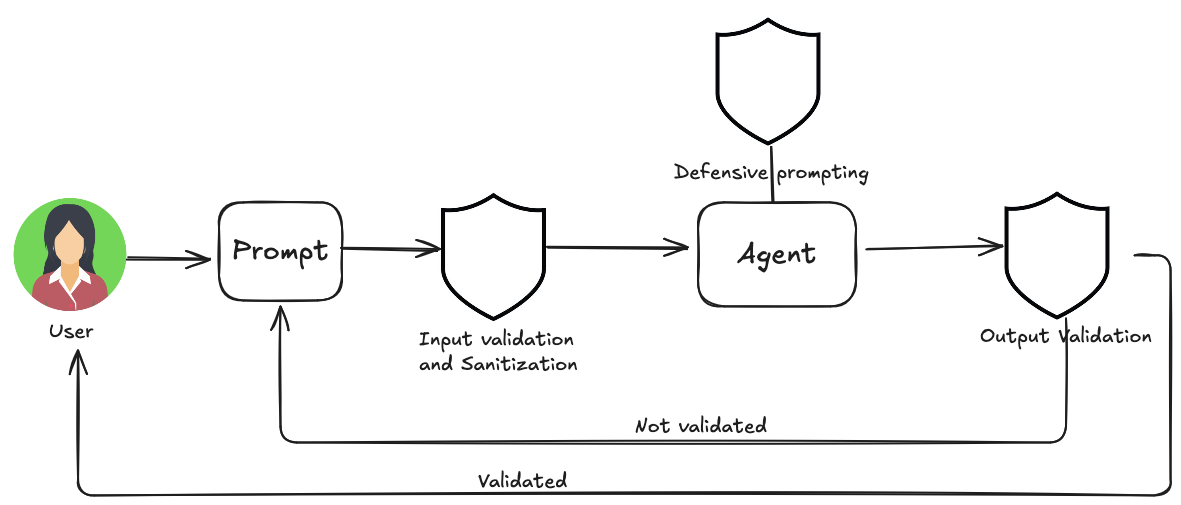
Guardrail-first agents provide solutions to manage the risks inherent in the agentic systems with multi-layered defense mechanism. In their simplest form, they wrap around the model such that we are validating the input to block malicious contents and filtering the outputs to catch undesireable responses. More advanced techniques include setting behavioral constraints via prompting, restricting tool usage, and integrating human-in-the-loop oversight for critical decisions. The goal of guardrails is not to limit agents utility, but to mold its behavior to favor trust, benefit, and predictability.
A.3 A2A: Agent 2 Agent communication protocol
A.4 Reasoning Capabilities
Chain-of-Thought(CoT) prompting significantly improves the LLMs complex reasoning abilities. by mimicking step by step thought process. There are 2 ways we can introduce a strong reasoning into the agentic workflow.
- Use SOTA reasoning models: These SOTA reasoning models have CoT baked in their reinforcement learning part, so that model automatically performs reasoning by breaking problem step by step.
- Use explicit instructions on the prompt to force the CoT like behavior
Tree of Thoughts(ToT) is a more advanced reasoning technique that builds upon CoT to allow LLM to explore multiple reasoning paths by branching into different intermediate steps. This allows models to solve complex problems by enabling backtracking, self-correction, and exploration of alternative solutions. It also allows model to evaluate multiple solutions and compare one another.
Self-correction (self-refinement) is a crucial aspect of an agent’s reasoning process, particularly within CoT/ToT. It invovles agent’s internal evaluation of it’s generated content and intermediate thought process, identification of ambiguities, information gaps, and inaccuracy. It thereby adjusts its approach accordingly.
A.5 Prioritization
AI Agents working on complex environments face a multitude of potential actions, conflicting goals, and finite resources. Without a clear method to determine their next move, these agents risk becoming ineffective. Prioritization provides a guideline for agents to rank tasks and goals and to undertake the most important ones first. This can be achieved by establishing clear criteria such as urgency, importance, dependencies, and resource cost. The agent then evaluates each potential next action against these criteria to determine the best course of action.